Query Data From Salesforce Object
This tutorial talks about how to query data from salesforce object using salesforce connector.
Prerequisites:
- Installing Salesforce connector(by login into anypoint exchange from studio you can install the Salesforce connector)
- Salesforce developer account
- Security token
- Consumer key and secret(If you are using the Salesforce connector to access an OAuth API, you also need a consumer key and secret)
There are below operations present to query data using Salesforce connector operation
- Query: This operation executes a query against the specified object and returns data that matches the specified criteria. The returned fields are String and we can convert the type we need
- Query All: Retrieves data from specified objects, it also gives all the deleted records, when we run the query with specific criteria then it gives the data that matches the criteria even if the record is deleted
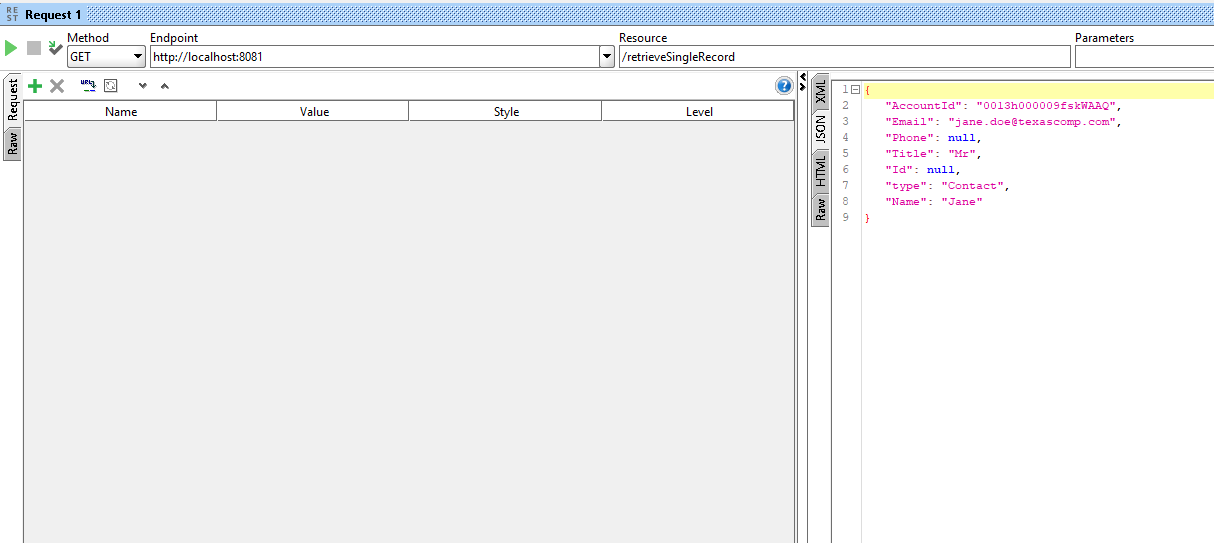
- Query Single: This operation executes a query against the specified object and returns the first record that matches the specified criteria
Query Operation
Create project in anypoint studio
Drag and drop Salesforce Query Connector to get the details of the salesforce object and configure the listener to trigger the request
Configure the connection details for Salesforce and use the Basic Username and Password connection (Username, Password, Securitytoken), you can also use other connections as well to do the configuration like Oauth UserName and Password etc

Provide the SOQL query to retrieve the records

Transform the payload to JSON
%dw 2.0
output application/json
---
Payload
Deploy the application and trigger the same using soapui/postman
INFO 2020-06-05 08:27:57,719 [[MuleRuntime].cpuIntensive.03: [retrievedatafromsf].retrievedata.CPU_INTENSIVE @499d040f] [event: 5b1a79f0-a6d8-11ea-8e48-040e3cd1eac7] org.mule.runtime.core.internal.processor.LoggerMessageProcessor: {
"Total Records Retrieved": 16
}

Query All
Drag and drop Query All operation from mule palette and provide the SOQL query to select all the records

Transform the payload to JSON
%dw 2.0
output application/json
---
Payload
Deploy the project and test from soapui/postman
INFO 2020-06-05 08:29:49,623 [[MuleRuntime].cpuIntensive.04: [retrievedatafromsf].retrieveallrecords.CPU_INTENSIVE @27af9b59] [event: 9dfcd241-a6d8-11ea-8e48-040e3cd1eac7] org.mule.runtime.core.internal.processor.LoggerMessageProcessor: {
"Total Records Retrived": 22
}
It gives 22 records where 6 records were deleted earlier

Query Single
Drag and drop Query single operation and provide the SOQL query to select the data

Transform the payload to JSON
%dw 2.0
output application/json
---
Payload
Deploy the project and test from soapui/postman
Only first record retrieved
Sample application: retrievedatafromsf sample application
Soapui project: RetrieveRecordsFromSF-soapui-project
I have a question about the SOQL query that can be created in the query operation. Can I only query fields that are on one object or can I include fields from a related object using for example Account.Name if my record is related to an account or customobject__r.fieldname__c to get a field from a related custom object?